How do you modernise a cloud environment with no downtime?
“Zero downtime” sounds like a marketing line, but it is just the consequence of one engineering discipline: you do not switch the whole system at once. Instead you stand the new up next to the old, send a fraction of traffic through the new first, watch, and only then move the rest. If something goes wrong you return in seconds, not hours. This article sets out the patterns that make that possible and the order to apply them in.
Planning a modernisation with no maintenance window?
Book a free 30-min call
Why a “big cutover” almost always means downtime
The classic scenario: the team builds a new version, schedules an overnight maintenance window, turns the old system off, starts the new one and hopes it works. The problem is twofold. First, a maintenance window is already downtime, even if planned. Second, if the new system does not come up cleanly, rollback means restoring the state from before the cutover, which with a migrated database is often not feasible in any reasonable time.
No-downtime modernisation inverts that logic. The old and new systems coexist, and the switch is gradual and reversible at every stage. It takes more discipline up front, but it removes the risky all-or-nothing moment.
The patterns that give you zero downtime
1. Strangler fig - replace piece by piece
Instead of rewriting the whole system at once, you wrap it in a routing layer (usually an API Gateway, Application Load Balancer or reverse proxy) and redirect individual functions to the new implementation, one at a time. The old monolith “dies off” gradually, and each moved piece is small and reversible. The name comes from the strangler fig tree, which wraps a host tree and replaces it without felling it overnight.
This is the core application-modernisation pattern. It lets you modernise a system that stays in production the whole time, with no single cutover day.
2. Blue-green - two identical environments
You keep two production environments: blue (current) and green (new). You deploy the change to green, test it on a production-grade configuration with no user traffic, then switch traffic from blue to green in one change (DNS, an ALB target group, or weighted routing). If something is wrong, you return to blue immediately. Blue-green suits replacing whole services or application versions.
3. Canary - traffic shifted by percentage
Rather than switching all traffic at once, you send the new version 1% first, then 5%, 25%, 50% and finally 100%, watching error and latency metrics at each step. If the canary shows a regression, you roll the steps back before the problem reaches most users. On AWS this is handled by CodeDeploy, App Mesh or weighted target groups; on GKE and Kubernetes by Argo Rollouts or Flagger.
4. Feature flags - separate deploy from release
A feature flag lets you deploy code to production in an off state and turn it on only when you are ready, for a chosen group of users. That makes “deploy” and “release” two separate decisions. Pulling a feature is a flag change, not a deployment, so it is a matter of seconds.
The hardest part: a database with no downtime
Most modernisations come unstuck not on the application but on the database. A schema change or an engine migration tempts you to lock writes “just for a moment”, and that is exactly the downtime. The answer is the expand-contract pattern (also called parallel change):
- Expand - you add new structures (columns, tables, a new engine) alongside the old ones, removing nothing. The application still reads and writes the old way.
- Migrate and dual-write - the application starts writing to both places at once, and you move historical data in the background. Reads still come from the old source.
- Switch reads - you move reads to the new source, still writing to both (a safety net in case you need to return).
- Contract - once the new source is confirmed, you remove the old write and the old structures.
For a whole-engine migration (say from a commercial database to PostgreSQL) you get the same effect with continuous replication: a tool like AWS DMS keeps the target in sync via CDC, and the cutover is just switching the application’s connection once replication lag drops to zero. We set out the tool-selection logic in our article on AWS lift-and-shift migration.
What order to put it in
No-downtime modernisation is not a choice of one pattern, it is a composition of them in the right order:
- Observability first. Without error, latency and SLO metrics you cannot tell whether a canary is healthy. Monitoring is a precondition, not an add-on.
- Then infrastructure reversibility. The whole environment in Infrastructure as Code (Terraform), so every environment can be recreated and blue-green is repeatable rather than manual.
- Then the routing layer. An API Gateway or ALB that lets you route traffic per function and per percentage.
- Finally the actual replacement - strangler fig for functions, expand-contract for data, feature flags for risky changes.
Skipping the first two steps is the most common reason “no-downtime modernisation” ends in downtime: you cannot safely shift traffic you cannot see, nor return quickly to a state you cannot recreate.
It works on any cloud
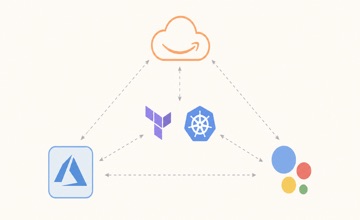
The patterns are portable, only the tooling layer changes. On AWS: ALB and API Gateway for routing, CodeDeploy for blue-green and canary, DMS for database migration. On GCP: Cloud Load Balancing, GKE with Argo Rollouts, Database Migration Service. On Azure: Application Gateway, App Service deployment slots, Azure Database Migration Service. The principle is the same everywhere: new alongside old, traffic shifted gradually, every step reversible.
How Devopsity runs no-downtime modernisation
Devopsity runs modernisation on AWS, GCP and Azure, and the approach itself is shared across all clouds. We start with what you need in place before the first switch: observability (SLOs, alerts, dashboards) and the whole environment in Terraform, so the modernisation is repeatable and reversible. Then we introduce the routing layer and move functions with the strangler fig pattern, migrate data with expand-contract or continuous replication, and hide risky changes behind feature flags. We modernise systems that stay in production throughout, with no maintenance windows. Only the per-platform tooling layer changes. Our deepest path is on AWS, where modernisation and migration go together, and the scope is on our AWS modernisation page; the starting point is often an AWS Well-Architected Review, which shows what to modernise first. For VMware or on-premise estates we set out the approach in our VMware to AWS migration guide.

Planning a modernisation with no downtime?
Book a free 30-minute call. We will review your environment and propose a modernisation plan with traffic shifted step by step and reversibility at every stage.
Frequently asked questions
How do you modernise a cloud environment with no downtime?
You modernise with no downtime incrementally, not with one big cutover. You stand the new component up next to the old one and shift traffic gradually: the strangler fig pattern replaces functions piece by piece, blue-green keeps two identical environments and switches traffic in one change, and canary shifts traffic by percentage while watching error metrics at each step. You migrate the database with an expand-contract pattern (new structures alongside old, write to both, only then switch reads) or with continuous CDC replication. The preconditions are observability and the whole environment in Infrastructure as Code, so every step is reversible. Devopsity runs these modernisations in production with no maintenance windows.
What is the strangler fig pattern in application modernisation?
The strangler fig is a gradual-replacement pattern. Instead of rewriting a whole application at once, you wrap it in a routing layer (API Gateway, ALB or reverse proxy) and redirect individual functions to the new implementation, one at a time, until the old system fully dies off. Each moved piece is small and reversible, and the system stays in production throughout. It is safer than one big cutover because there is no all-or-nothing moment.
How do you migrate a database with no downtime?
You migrate a database with no downtime using the expand-contract pattern: first add new structures alongside the old ones (expand), then have the application write to both at once while historical data moves in the background, then switch reads to the new source (still writing to both for safety), and finally remove the old structures (contract). For a whole-engine change, continuous CDC replication with a tool like AWS DMS gives the same effect, where the cutover is switching the application’s connection the moment replication lag drops to zero. The key is that every stage can be returned to the previous state.
What is the difference between blue-green and canary?
Blue-green and canary are two traffic-switching strategies. Blue-green keeps two full production environments and switches all traffic from one to the other in a single change, with an immediate return if there is a problem, which suits replacing whole services or versions. Canary shifts traffic gradually by percentage (1%, 5%, 25% and on), watching metrics at each step, which catches a regression before it reaches most users. In practice they are often combined: the green environment is deployed blue-green style, and traffic is moved onto it with canary.