
That’s when teams start looking at AWS. We’ve delivered multiple Heroku to AWS migrations for clients in fintech, healthcare, and SaaS. This post covers what the process actually looks like, what decisions you’ll face, and where teams commonly get stuck.
Why teams leave Heroku
The reasons cluster around a few themes. Cost is the most common trigger. A rule of thumb we’ve heard repeated at industry meetups: once your Heroku bill crosses $10k/month, you’re overpaying for what you get. But cost alone isn’t the only reason to move earlier.
Security and compliance is often the real forcing function. Heroku’s shared infrastructure model makes it difficult to implement network isolation, private subnets, or the kind of IAM controls that auditors expect. If you need to pass SOC 2, ISO 27001, or Cyber Essentials Plus, you’ll hit walls on Heroku that don’t exist on AWS.
The third is operational control. No custom VPC configuration, limited logging, no native integration with tools like Datadog or PagerDuty at the infrastructure level, and no way to run background jobs that need more than 512MB of memory without paying premium prices.
And then there’s developer experience. Heroku’s simplicity is its selling point, but it becomes a constraint when your team needs preview environments tied to pull requests, automated security scanning in the pipeline, or deployment strategies beyond “push to main”. On AWS, you get the full scope of CI/CD level QA and security tooling: SAST/DAST scanning, container image inspection, policy-as-code checks, and automated performance testing. That’s a richer automation layer that Heroku simply can’t offer.
What Heroku services map to on AWS
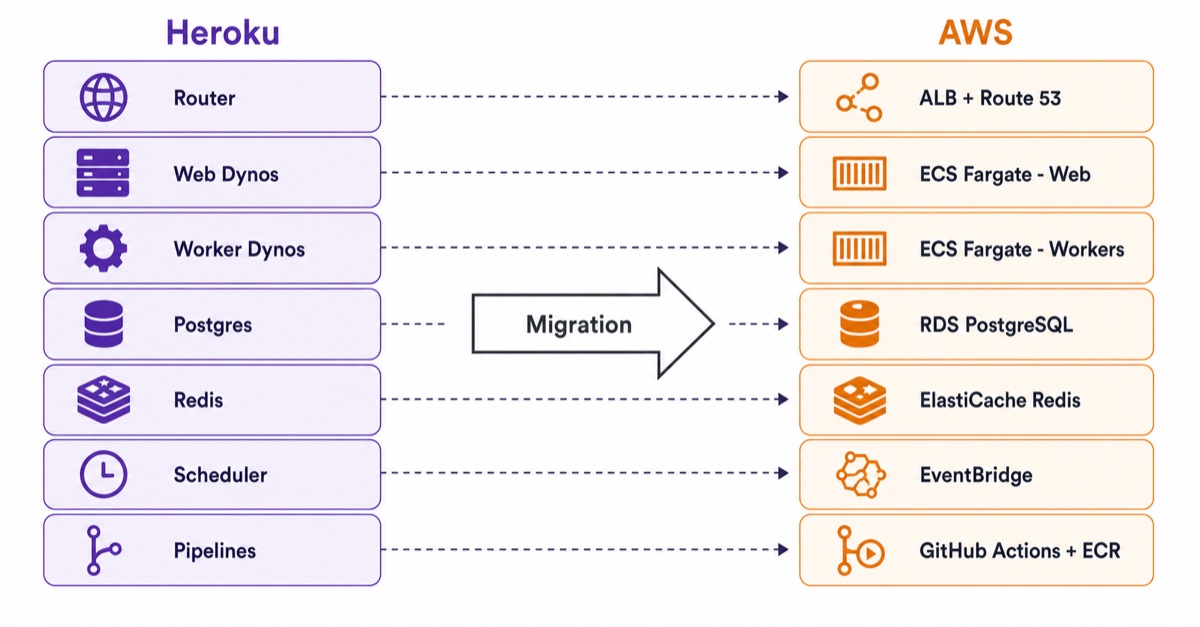
The mapping isn’t one-to-one, but here’s how the core components translate:
The migration process
Every Heroku to AWS migration we’ve delivered follows roughly the same phases:

Thinking about migrating from Heroku?
Book a free 30-minute call to discuss your setup and get a rough cost comparison.
The organisational shift
This is the part most technical guides skip. A Heroku to AWS migration isn’t just an infrastructure change. It’s a workflow change for your entire engineering team.
On Heroku, a single developer can deploy, scale, and manage everything. On AWS, you gain power but also responsibility. Someone needs to own the infrastructure code. Someone needs to review Terraform changes. Your team needs to understand how environments are promoted and how secrets are managed.
We assess your team’s current workflow and recommend the minimal organisational changes needed to operate on AWS effectively. Sometimes that means training developers on the new deployment flow. Sometimes it means introducing a lightweight platform engineering function. The goal is to match the operational model to your team’s size and maturity, not to impose enterprise processes on a 10-person startup.
Common mistakes
Underestimating the CI/CD rebuild. On Heroku, deployment is a git push. On AWS, you need to build and maintain a pipeline. Teams that don’t budget time for this end up with fragile manual deployments that defeat the purpose of migrating.
Ignoring networking from the start. Heroku handles networking invisibly. On AWS, you need to design VPCs, subnets, security groups, and decide on public vs private networking. Getting this wrong early means painful refactoring later.
Migrating everything at once. A phased approach (staging first, then dev, then production) catches issues before they affect users. We’ve seen teams try big-bang migrations and spend weeks debugging issues that a staged approach would have caught in hours.
Not containerising properly. Copying Heroku’s Procfile into a Dockerfile without understanding the differences leads to containers that work locally but fail in ECS. Health checks, graceful shutdown, signal handling, and log routing all need attention.
Timeline and cost
A typical Heroku to AWS migration for a single application with 3-5 services takes 4-8 weeks. More complex setups with multiple applications, shared databases, or compliance requirements can take 2-4 months.
The AWS infrastructure cost after migration is usually 40-60% lower than the equivalent Heroku bill, depending on how aggressively you right-size resources. We build a detailed cost model before starting any migration so you know the expected savings upfront. The migration itself is a one-time investment that pays back within 3-6 months through reduced hosting costs alone. For a full breakdown of migration costs by company size and ongoing AWS infrastructure costs, see our complete AWS migration costs and process guide and the AWS migration cost calculator with real numbers by company size.
When to stay on Heroku
Not every team should migrate. If you’re a small team shipping a single application with low traffic and no compliance requirements, Heroku’s simplicity is worth the premium. The migration makes sense when:
- Monthly Heroku costs exceed what you’d pay on AWS for the same workload
- You need network isolation, private subnets, or VPN connectivity
- Compliance requirements (SOC 2, ISO 27001, Cyber Essentials Plus) demand infrastructure controls Heroku can’t provide
- You need to scale beyond what Heroku’s dyno model supports efficiently
- You want full ownership of your infrastructure defined as code
Frequently asked questions
How long does it take to migrate from Heroku to AWS?
A single application with 3-5 services typically takes 4-8 weeks. More complex setups with multiple applications, shared databases, or compliance requirements run 2-4 months. The biggest variable is the CI/CD rebuild - on Heroku deployment is a git push; on AWS you build and own the pipeline.
How much does a Heroku to AWS migration cost, and how much will I save?
The migration is a one-time engagement that typically pays back within 3-6 months, because AWS infrastructure after migration usually runs 40-60% cheaper than the equivalent Heroku bill. As an AWS Advanced Tier Partner we can often offset 50-80% of the engagement cost through AWS funding programmes (PoC, MAP, or Incremental Workload for Startups), assessed during the initial scoping call.
What does Heroku map to on AWS?
Dynos map to ECS on Fargate (or EKS for Kubernetes), Heroku Postgres to RDS for PostgreSQL, Heroku Redis to ElastiCache, Scheduler to EventBridge plus ECS tasks, Config Vars to Systems Manager Parameter Store or Secrets Manager, and Pipelines to GitHub Actions or CodePipeline. The mapping is not one-to-one, but every core component has a managed AWS equivalent.
Can I migrate from Heroku to AWS without downtime?
Yes, for the database - the highest-risk phase. Where a maintenance window is acceptable we use a straightforward pg_dump/restore; where downtime is not an option we use AWS DMS for continuous replication from Heroku Postgres to RDS, then a final cutover. We keep Heroku running in parallel for 1-2 weeks after DNS cutover as a rollback path.
Does AWS funding cover a Heroku migration?
It can. Depending on your scale and situation, the AWS Proof of Concept (PoC), Migration Acceleration Program (MAP), and Incremental Workload for Startups (IW) programmes can cover 50-80% of the engagement cost. IW in particular has a lower threshold that fits smaller and startup migrations. As an AWS Advanced Tier Partner we assess eligibility and submit on your behalf.
How we can help
We’ve delivered Heroku to AWS migrations for fintech companies needing PAM integration, healthcare platforms requiring NHS compliance, and SaaS products outgrowing Heroku’s scaling model. Every migration is delivered with infrastructure as code, automated CI/CD, and documented runbooks. The target architecture is designed against the AWS Well-Architected Framework, ensuring your new environment meets best practices for security, reliability, performance, and cost from day one.
See our Heroku to AWS migration case study for a detailed example of how we migrated a fintech platform with 3-4 hours of downtime and 40%+ cost reduction. For what comes after migration (security hardening, Graviton compute optimisation, and developer experience improvements), see our post-migration modernisation case study.
Ready to evaluate whether migration makes sense for your setup? Our cloud migration services start with a no-commitment assessment of your current Heroku environment.
![AWS Cloud Migration: Costs, Tools & Step-by-Step [2026]](/img/blog/post/2026-06-10/360x220.jpg)
![AWS Migration Cost Calculator: Real Numbers by Company Size [2026]](/img/blog/post/2026-08-25/360x220.webp)
![Azure Equivalent of AWS ECS, Fargate & EKS: Container Service Mapping [2026]](/dist/img/blog/posts/2024-02-16/360x220-345.jpg)

